
• Login
    • Transcript Repository
    • Client Portal
    • Resource Portal
  • Pay Online
  • Contact Us
1.866.999.8310
Aptus Court Reporting
  • Home
  • Services
    • Court Reporting
    • Trial Support Services
    • Legal Video Services
  • Technology
    • Aptus AI Summaries & Analysis
    • Aptus Capture
    • Aptus Connect
    • vTestify
  • About Us
    • Acquisitions
    • The Aptus Difference
    • Meet the Team
    • Independent Contractor Resources
    • Insights
  • Locations
  • Schedule Now
  • Click to open the search input field Click to open the search input field Search
  • Menu Menu
  • Home
  • Services
    • Court Reporting
    • Trial Support Services
    • Legal Video Services
  • Technology
    • Aptus AI Summaries & Analysis
    • Aptus Capture
    • Aptus Connect
    • vTestify
  • About Us
    • Acquisitions
    • The Aptus Difference
    • Meet the Team
    • Independent Contractor Resources
    • Insights
  • Locations
  • Schedule Now
  • Pay Online

Tag Archive for: Legal Technology

Posts

Remote Proceedings – Tips for Facilitating Remote Trials & Mediation

Remote Proceedings
lawyer-using-laptop-for-remote-trial

As the pandemic forced people to rely more heavily on remote access to products and services, we learned how to successfully navigate these circumstances. In fact, we realized the enormous benefits of conducting business, education, and community outreach via online spaces. The justice system is no exception. We now have a better understanding of how to facilitate remote trials and mediation. So, in this post, we examine some key benefits and tips for those involved in remote judicial proceedings.

What are remote trials?

There are a few different ways to conduct remote trials and mediation, but they all have one common goal: to allow parties involved in a legal proceeding to appear before a judge or jury without being in the same physical location. This can be done by video conferencing, teleconferencing, or even having the proceedings take place entirely online.

Benefits of conducting remote trials and mediation

There are many benefits to conducting remote trials, including:

  • Increased access to justice: Remote court trials can make it easier for people to access the justice system, as they do not need to travel to a court location. This is especially beneficial for people who live in rural or remote areas.
  •  Cost-effective: Remote court trials can save on costs associated with travel and accommodation for lawyers, witnesses and other court personnel.
  •  More efficient: Remote court trials can help to reduce delays in the justice system, as they do not rely on the availability of physical court facilities or personnel.

Tips for judges presiding over remote trials

 Here are tips for presiding over a remote court trial:

  • Establish ground rules at the beginning of the trial. Let the parties know what is expected of them in terms of decorum and participation.
  • Make sure everyone can see and hear each other. This may mean using video conferencing software or other technology to ensure everyone can see and hear each other clearly.
  • Be patient with technology glitches. There are bound to be some hiccups when moving a trial online, so be patient and try to work through them as best you can.
  • Keep an open mind. Just because a trial is happening remotely doesn’t mean it’s any less important or serious than an in-person trial. 

Tips for attorneys preparing for remote trials and mediation

If you are an attorney, below are some tips for  preparing for a remote trial or mediation:

  • Get organized and prepared. This is especially important when working remotely and communicating virtually. Make sure to have all your documents in one place so that you can easily access, and become familiar with the technology you will be using for the trial, and there are no surprises on the day of the proceeding.
  • Keep an open line of communication. With everyone working from home, it can be easy for miscommunications to happen. Stay in close contact with your client leading up to the trial to make sure they are updated on any changes and that everyone is on the same page.
  • Remain flexible. Because so many things are out of our control, it’s important to be flexible in your approach to trial. If there are any unforeseen technical difficulties or last minute changes, try to go with the flow and adjust as needed. The goal is to direct a strong case for your client, no matter what obstacles come up.

Tips for testifying in remote trials

If you’re scheduled to testify in a remote court trial, there are a few things you can do to prepare and make sure your testimony is effective.

  • Know the technology. It’s important to understand the technology you’ll be using. Make sure you know how to log into the video conferencing platform the court is using, and test your audio and video beforehand.
  • Give clear and concise answers. When you’re testifying, remember that the judge and jury can’t see your entire body, so they can’t easily interpret your body language. Because of this, it’s important to be clear and concise in your answers. Look directly into the camera when you’re speaking, and avoid distractions in your environment.
  • Dress appropriately. It’s also important to dress professionally for your remote court appearance, just as you would for an in-person trial. First impressions matter, so make sure you look presentable and trustworthy.
  • Prepare for any technical difficulties. If your audio or video cuts out, remain calm and try to troubleshoot the problem. If all else fails, have your attorney contact the court clerk to sort out the issue.

Use the tips above to get the most out of your remote experience. If you’re seeking advanced and user-friendly technology, leverage Aptus’ innovative technology & resources to conduct your remote trials & mediations anywhere across the country.  Ready to get started? Contact us to schedule today!

https://aptuscr.com/wp-content/uploads/2022/07/Lawyer-Using-Laptop.jpg 836 1254 Aptus Admin https://aptuscr.com/wp-content/uploads/2021/08/APTUS-OFFICIAL-Horizontal-margin-300x112.png Aptus Admin2022-07-22 15:54:202022-07-22 15:54:22Remote Proceedings – Tips for Facilitating Remote Trials & Mediation

A Trial Tech’s Bag of Tricks

Legal Videography

As a trial tech, backups for everything are a must and should be standard operating procedure when going to trial. Cables, adapters, switchers, amps and most importantly, laptops, all need to be duplicated in the event something fails. Having your case backed up and updated is like car insurance – you have it but hopefully never need it. While car insurance is a legal requirement, backup devices are not, unfortunately. I’ve been doing trials since 2009 and I will admit, I only needed my backup laptop a handful of times. Still, I find myself overly cautious and bring the backup system every time I go to trial. I should add that when I say backup laptop, I’m not talking about an “off the shelf computer.” No, a backup laptop should virtually mirror your main laptop, so it can still function alike.

Most recently, I went to trial in Orange County and while transferring the case during lunch, my backup laptop failed. With the limited time I had, I couldn’t trouble shoot in time for the afternoon session. Rather than roll into the courtroom without a backup, I looked in my bag and saw my iPad. As the bells start dinging in my head, I turned it on, hooked it up to my computer and started loading the exhibits. I have TrialPad, a popular app for trial presentation on an iPad. It’s a simple interface that has some of the same features as Trial Director and OnCue. Luckily, there was no video involved in this trial (TrialPad has limited video editing features), so it was a quick transfer.

Watch the TrialPad demo below.

We resumed trial at 1:30 pm and concluded at 4 pm. Smooth sailing and no need for the iPad, of course. However, since then, I’ve been putting everything on my iPad in addition to my backup laptop. I’m sure I speak for most trial techs when I say that you can never have too many backups or plan B’s. Well, I’m sure I speak for all the GOOD trial techs in that regard. I will also add, at this particular trial, I did not have an Apple TV but only the adapters to plug the iPad into the projector. One of the features of using an iPad is that you don’t have to be tethered to cables (presenting wirelessly would present potentially another challenge). At the very least, I was prepared to still present digitally instead of the using the ELMO.

Every trial tech has their bag of gadgets and their own method for backing up cases. As I write this, I know a lot of techs that hate iPads and the TrialPad app. I certainly understand. Depending on an app-based product to present your entire case can be risky as apps are prone to crashes and failures. However, in a technology driven world where there is an abundance of options, it certainly couldn’t hurt to bring something as a third option before going back to butcher paper. In the end, the jury will appreciate not being subjected to the low-tech ELMO. More than likely, your clients will appreciate it as well.

About the Author: Mike Tisa is the Director of Litigation Technology for Aptus Court Reporting. He is a Certified Legal Video Specialist through the National Court Reporters Association. Mike has been in the legal field since 2007 and is continually researching advancements in the legal technology industry. For more on Mike’s background, visit him on LinkedIn.

https://aptuscr.com/wp-content/uploads/2021/08/qtq80-C6BIBL.jpeg 663 1582 garromarketing https://aptuscr.com/wp-content/uploads/2021/08/APTUS-OFFICIAL-Horizontal-margin-300x112.png garromarketing2018-04-24 10:36:552021-11-05 21:39:05A Trial Tech’s Bag of Tricks

Are Court Reporters Now Technology Experts?

California Court Reporters, Video Conferecing

The Traditional Definition of Court Reporting

court-reporterCourt Reporter – noun

a stenographer employed to record and transcribe an official verbatim record of the legal proceedings of a court.

This is the definition of a court reporter (dictionary.com). Their job, as defined above, and understood by the courts is to capture everything that is being said in the room and then prepare a transcript. There is no official record without court reporters. While simply defined, the duties of a reporter in the modern day are expanding well beyond the “standard definition.”

Then vs. Now – A Court Reporter’s Arsenal of Technology

Let’s look at a few scenarios where technology is becoming more prevalent in depositions both in the actual room and remotely:

Real-time: This feature allows attorneys to instantly view the transcript in real-time, hence the name. This requires the reporter to set up the connection by setting up cloud-based streaming sessions and sometimes troubleshooting the connection to another attorney’s computer. Oh yeah, now you can stream to iPads and tablets as well, so make note of that.

eDepoze: Here’s a quick description of this product. It allows the attorneys to conduct a deposition with no paper exhibits. Using an iPad or laptop, eDepoze’s cloud-based server helps mark and store exhibits with the attorney marking everything. No need for the reporter to keep exhibit stickers. However, her role is still vital to the proceedings. The reporter must first go through a training session with an eDepoze rep. After that, they are a Certified eDepoze Reporter. Great, awesome, terrific. Now, the reporter will be responsible for helping all parties log in, including the witness. Should anything go wrong, since they are the Certified Reporter, are they responsible for troubleshooting as well?

Web-based Video Conferencing: This is a popular medium to conduct depositions. Often times, the reporter will be with the witness while counsel is remote. They may be asked to setup a laptop with a webcam. Sounds easy, right? Is it really, though? What happens if the connection fails? What happens if the webcam fails? What happens if the computer crashes?

When adding in all these technologies in addition to the normal duties of taking down what EVERYONE IN THE ROOM IS SAYING, court reporters end up going well beyond their “defined” role.

What do you think? Should the definition of a court reporter be expanded to include other duties?

https://aptuscr.com/wp-content/uploads/2021/08/qtq80-kCGvdC.jpeg 1440 2160 garromarketing https://aptuscr.com/wp-content/uploads/2021/08/APTUS-OFFICIAL-Horizontal-margin-300x112.png garromarketing2016-03-18 11:55:182021-11-05 21:39:07Are Court Reporters Now Technology Experts?

Optimizing Your Web-Based Video Conference – Part II

Aptus News, Video Conferecing

OPtimizing Web-based video conferencingIn a previous blog, I outlined some steps to take in order to optimize you web-based video conference (Click here for previous article). Since then, I thought it best to add a few more so all your bases are covered.

6.) Make sure your laptop has anti-virus software. The other day while conducting a test, I saw a little notification pop up reminding me to check my anti-virus software. This isn’t like ignoring an oil change or an overdue library book. No, this is serious! Without the proper anti-virus protection, well, in a word – VIRUSES! Yeah, probably not a good idea to conduct a deposition with privileged information being exchanged when the possibility of cyber hackers exist.

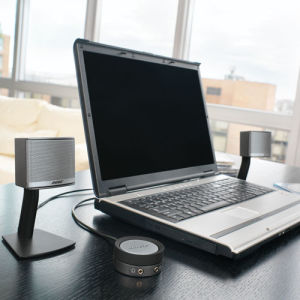
7.) Use external speakers. Laptops come in all shapes and sizes and so do the specifications. One might have a superior camera but limited gain when it comes to volume. Pick up a set of desktop speakers in case you have a soft-spoken speaker or in case the acoustics of the room interfere with the sound.

8.) Disable face-tracking on your webcam. The face tracking does what the title implies, tracks your face. That means every time you move, it will follow your face wherever it goes. So if you’re conducting a deposition and you keep looking down at your notes, the camera will follow your face as you look down. This can make the other participant frustrated and even dizzy with all the movement.

9.) Check your Power Save settings. In order to save power consumption and avoid screen burnout, most computers will either go dark or go into Screen Saver mode. This is common when there is no activity for a predetermined time. Unfortunately, only having a browser window open doesn’t count as activity. In order to avoid having your screen go dark or show pictures of your family vacation while conducting a deposition, consult with your IT professional about changing your Power Save settings during your session.

About the Author: Mike Tisa is the Director of Litigation Technology for Aptus Court Reporting. He is a Certified Legal Video Specialist and a Trial Presentation Professional through the National Court Reporters Association. Mike has been in the legal field since 2007 and is continuously researching advancements in the legal technology industry. For more on Mike’s background, visit his LinkedIn profile. http://www.linkedin.com/in/miketisa/

https://aptuscr.com/wp-content/uploads/2021/08/iStock-1160205593.jpg 1415 2120 garromarketing https://aptuscr.com/wp-content/uploads/2021/08/APTUS-OFFICIAL-Horizontal-margin-300x112.png garromarketing2015-02-02 09:41:142021-11-05 21:39:07Optimizing Your Web-Based Video Conference – Part II

Optimizing Your Web-Based Video Conference

Aptus News, Video Conferecing

As litigators turn to more cost effective ways to conduct out of town depositions, web-based video conferencing is becoming increasingly popular. As an alternative to traditional video conferencing, web-based video conferencing allows more flexibility requiring only a high speed internet connection and a computer equipped with a webcam and microphone. This eliminates the somewhat difficult task of locating two locations that are equipped with traditional video conferencing systems. So if all you need is a computer, internet, webcam and microphone, everything should be set to go, right? Think again…

While having all those items are paramount in order to proceed with your deposition, there are some preliminary steps to consider and take. Here are my top tips for conducting a smoother web-based video conference:


1.) Verify that both locations have high speed internet, not just internet. A hardwired connection is usually the best source for the fastest bandwidth. Since this is an increasingly popular way to conduct depositions, some law firms have dedicated WIFI networks designed specifically for this type of service. This is a luxury and not common, especially at hotels. Make sure your scheduling coordinator asks for a high speed, hardwired internet connection.


2.) Make sure your computer monitor is big enough or at least has multiple outputs. You probably wouldn’t want both the deponent and opposing counsel to have to huddle around a tiny laptop screen. Make sure the monitor is big enough to allow both parties to comfortably participate or use one of your outputs to connect to a larger monitor or TV.


3.) Be prepared by having an audio backup through the phone. As we all know, the internet has a mind of its own. Even with traditional video conferencing systems, freezing and audio dropouts can AND DO occur. Nothing is more frustrating to all parties, especially the court reporter, to be in mid-answer and lose the rest due to poor connectivity. If you are unsure of the internet connection, try setting up an audio backup that integrates the phone with the video. This allows you to see the witness and hear them through the phone while the audio and video sync up with virtually no latency.


4.) Test, test and test again. There is no such thing as over testing when it comes to technology. Have both parties sit at different angles and talk to see where it might be best to place the deponent to ensure they are both seen and heard. Also, try to test using the equipment you will actually be using for the deposition. One computer might work great and the other might require a little tweaking. DO NOT put yourself in the position of having to troubleshoot on the day of the deposition, especially when it could have been avoided.


5.) Make sure the deponent is a good candidate for conducting a deposition this way. While this can be a great and cost effective way to conduct a deposition, it might not be the best way. If the deponent is hard of hearing or soft spoken, it could make for a potentially long day. Constantly asking a deponent to repeat his answer and having them constantly ask counsel to repeat his question can become extremely tedious. It also might sacrifice the quality of the record because more than likely if you are having trouble hearing the witness, the court reporter is also having trouble.

About the Author: Mike Tisa is the Director of Litigation Technology for Aptus Court Reporting. He is a Certified Legal Video Specialist and a Trial Presentation Professional through the National Court Reporters Association. Mike has been in the legal field since 2007 and is continuously researching advancements in the legal technology industry. For more on Mike’s background, visit his LinkedIn profile. http://www.linkedin.com/in/miketisa/

https://aptuscr.com/wp-content/uploads/2021/08/iStock-515071286.jpg 1414 2119 garromarketing https://aptuscr.com/wp-content/uploads/2021/08/APTUS-OFFICIAL-Horizontal-margin-300x112.png garromarketing2014-06-24 09:56:502021-11-05 21:39:07Optimizing Your Web-Based Video Conference

Make It Easier with Electronic Copies

Aptus News, California Court Reporters, Changes in Court Reporting

We are definitely in the electronic age of technology. Paper files can be hard to keep track of and keep secure. Aptus provides a solution: electronic copies for clients with a private link to a secure repository where clients can view and download a full PDF, a mini PDF, or a .PTX (e-trans file).

Exhibits can be viewed and downloaded digitally, and files are available at your fingertips whenever you need them.

Benefits of electronic copies:

  • hyper-linked exhibits in PDF transcripts

  • electronically-signed transcripts

  • all exhibits included in one secure link

  • can be easily emailed to multiple counsel

Out with the old and in with the new! Technology is an ever-changing force in the legal industry and we are here to make sure your firm is kept up-to-date with the latest advancements.

Contact your sales rep to make sure you’re accessing all the features your electronic deliverables have to offer.


https://aptuscr.com/wp-content/uploads/2021/08/iStock-695909414.jpg 1517 1977 garromarketing https://aptuscr.com/wp-content/uploads/2021/08/APTUS-OFFICIAL-Horizontal-margin-300x112.png garromarketing2014-03-03 10:10:312021-11-05 21:39:07Make It Easier with Electronic Copies
Search Search

Recent Posts

  • Aptus Court Reporting Expands Sacramento Presence with Acquisition of University Reporters
  • Best Practices for Remote Depositions (and How to Avoid Common Issues)
  • How AI Is Influencing Court Reporting and Litigation Support
  • Why Deposition Summaries and Analysis Matter in Litigation
  • California’s Court Reporter Shortage: How Aptus Is Helping Bridge the Gap

Aptus is a leading legal services agency in court reporting, arbitration and trial support services.

DISCLOSURES

  • Terms of Use
  • Privacy Policy

QUICKLINKS

  • Home
  • Services
  • About Us
  • Locations
  • Insights
  • Contact
  • Acquisitions
  • Schedule Now
  • Independent Contractor Resources

ONLINE PAYMENTS

Pay Online

LOGIN

  • Client Portal
  • Transcript Repository
  • Resource Portal

LOCATIONS

San Diego
401 W. A Street, Suite 1680
San Diego, CA 92101

Orange County
2040 Main Street, Suite 240
Irvine, CA 92614

San Francisco
235 Pine Street, Suite 1100
San Francisco, CA 94104

Riverside
6809 Indiana Ave, Suite 100
Riverside, CA 92506

Sacramento
2450 Venture Oaks Way, Suite 200
Sacramento, CA 95833

Sacramento
83 Scripps Dr., Suite 120
Sacramento, CA 95825

Los Angeles
1000 Wilshire Boulevard, Suite 1900
Los Angeles, CA 90017


Fresno
8050 N. Palm Avenue, Suite 300 Fresno, CA 93711

Oakland
1300 Clay Street, Suite 600
Oakland, CA 94612

Chesterfield, MO
400 Chesterfield Center
Suite 400
Chesterfield, MO 63017

Clayton, MO
8112 Maryland Avenue
Suite 400
Clayton, Missouri 63105

St. Louis, MO
100 South 4th Street
Suite 550
St. Louis, MO 63102

Seattle, WA
400 University Street
Suite 300
Seattle, WA 98101

© Copyright [year] - Aptus Court Reporting
  • Link to LinkedIn
  • Link to Facebook
Scroll to top Scroll to top Scroll to top

This site uses cookies. By continuing to browse the site, you are agreeing to our use of cookies.

Accept settingsExitSettings

Cookie and Privacy Settings


How we use cookies

We may request cookies to be set on your device. We use cookies to let us know when you visit our websites, how you interact with us, to enrich your user experience, and to customize your relationship with our website.

Click on the different category headings to find out more. You can also change some of your preferences. Note that blocking some types of cookies may impact your experience on our websites and the services we are able to offer.

Essential Website Cookies

These cookies are strictly necessary to provide you with services available through our website and to use some of its features.

Because these cookies are strictly necessary to deliver the website, refusing them will have impact how our site functions. You always can block or delete cookies by changing your browser settings and force blocking all cookies on this website. But this will always prompt you to accept/refuse cookies when revisiting our site.

We fully respect if you want to refuse cookies but to avoid asking you again and again kindly allow us to store a cookie for that. You are free to opt out any time or opt in for other cookies to get a better experience. If you refuse cookies we will remove all set cookies in our domain.

We provide you with a list of stored cookies on your computer in our domain so you can check what we stored. Due to security reasons we are not able to show or modify cookies from other domains. You can check these in your browser security settings.

Google Analytics Cookies

These cookies collect information that is used either in aggregate form to help us understand how our website is being used or how effective our marketing campaigns are, or to help us customize our website and application for you in order to enhance your experience.

If you do not want that we track your visit to our site you can disable tracking in your browser here:

Other external services

We also use different external services like Google Webfonts, Google Maps, and external Video providers. Since these providers may collect personal data like your IP address we allow you to block them here. Please be aware that this might heavily reduce the functionality and appearance of our site. Changes will take effect once you reload the page.

Google Webfont Settings:

Google Map Settings:

Google reCaptcha Settings:

Vimeo and Youtube video embeds:

Other cookies

The following cookies are also needed - You can choose if you want to allow them:

Privacy Policy

You can read about our cookies and privacy settings in detail on our Privacy Policy Page.

Privacy Policy
Accept settingsExit
You are now leaving the Aptus Court Reporting website.

As a convenience to our clients, Aptus offers safe & secure online payments through a third-party payment processor. To take advantage of this online payment option, simply click “Pay Now” below, and you will be redirected to a secure payment site to process your payment.

Pay Now
No, Thank You
Aptuscr.com is a 100% secure website.